MO801/MC972 - Topics in Computer Architecture and Hardware: From Logic Gates to AI
Rodolfo Azevedo
Institute of Computing, University of Campinas (UNICAMP), Brazil
rodolfo.azevedo@unicamp.br
http://www.ic.unicamp.br/~rodolfo/mo801
What to expect from this course?
In this course, students go through the process of building a computing system from logic gates: designing a processor and a few peripherals, developing the minimal software needed to capture data from those peripherals, running an AI workload on that data, and finally building a hardware accelerator for the resulting algorithm.
The destination: AI at the edge
Three classic TinyML problems:
- Keyword Spotting - "did someone just say the wake word?"
- MNIST - classify a handwritten digit
- Anomaly detection - is this sensor reading normal?
All three: a small int8 neural network, dominated by multiply-accumulate (MAC) operations.
Our running example: Keyword Spotting
Based on TFLite Micro's micro_speech: a small convolutional network (tiny_conv, Conv2D + FC + softmax) over MFCC audio features (~19 KB quantized model, ~91% accuracy on 4 classes).
By the end of the semester, your own RISC-V CPU + a custom accelerator you designed will classify spoken keywords - faster than your CPU alone could.
The roadmap
| Module | Phase | Weeks | Topics | Deliverable |
|---|---|---|---|---|
| M00 | Introduction | 1 | AI-at-the-edge motivation · KWS workload · toolchain first look | Lab 1 |
| M01 | Digital Design & SV | 1–4 | Combinational/sequential logic · FSMs · Verilator · Tang Nano 9K bringup | Labs 2–4 |
| M02 | RISC-V Architecture | 4–7 | RV32I (47 instr., 6 formats) · multicycle datapath · control FSM · C compilation | Lab 5 · Project 1 |
| M03 | HW/SW Interfaces | 8–10 | Memory-mapped bus · Zicsr / Zicntr / Zmmul / CMAC · UART · timer · GPIO | Project 2 |
| M04 | TinyML on the Edge | 10–11 | tiny_conv (~19 KB, ~91%) · int8 C kernel · MFCC features · profiling | Lab 6 |
| M05 | AI Accelerators | 12–14 | 4-wide int8 MAC array · local BRAM buffer · roofline model · speedup | Project 3 |
| M06 | Closing | 15 | Off-the-shelf alternatives · final presentations · retrospective | — |
The stack you will build
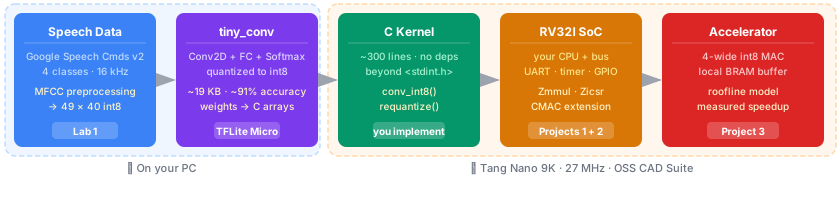
Three projects, each running on real hardware (Tang Nano 9K, 27 MHz):
- Project 1 · RV32I core: passes all instruction tests in Verilator, runs C on the board
- Project 2 · Extended SoC: bootloader over UART, peripherals, ISA extensions
- Project 3 · Accelerated KWS: measured cycle counts before and after; roofline analysis
The labs
The key goal of the labs is to get you comfortable with the toolchain and the board. Labs are not graded. They are here to help you to build confidence, skills and finish your projects.
| Lab | When | Topic | What you do |
|---|---|---|---|
| 1 | Week 1 | KWS on PC | Train tiny_conv on Colab, run inference locally, estimate MAC count |
| 2 | Weeks 1–4 | Toolchain | Install OSS CAD Suite; synthesize and deploy your first LED blink to the Tang Nano 9K |
| 3 | Week 2 | SV: combinational | Implement a 2-to-4 decoder in SystemVerilog; simulate with Verilator; deploy to the board |
| 4 | Weeks 3–4 | SV: sequential | Implement a traffic light FSM; test all state transitions; deploy to hardware |
| 5 | Weeks 6–10 | Performance | Compile the same C program at -O0 and -O2; measure the cycle count difference on your CPU |
| 6 | Week 11 | KWS kernel | Read and run the int8 inference kernel on your PC; trace conv_int8 and requantize |
| 7 | Week 11 | Profiling | Instrument the KWS kernel with cycle counters; identify the bottleneck layer for Project 3 |
Tools and platform
- Board: Sipeed Tang Nano 9K (Gowin GW1NR-9C, 8 640 LUTs, 64 Mbit PSRAM)
- Toolchain: OSS CAD Suite (Yosys, nextpnr, Verilator, GTKWave, openFPGALoader) — fully open source
- HDL: SystemVerilog
- AI: TensorFlow Lite Micro (training/export) + a minimal hand-written int8 inference kernel (on-device)

Inspiration
- The Elements of Computing Systems: Building a Modern Computer from First Principles. Nisan & Schocken. 2nd Ed. MIT Press, 2021.
- A Practical Introduction to Hardware/Software Codesign. Patrick Schaumont. 2nd Ed. Springer, 2013.
- Digital Design and Computer Architecture: RISC-V Edition. Harris, Sarah & Harris, David. Morgan Kaufmann, 2021.

Bibliography
- Patrick R. Schaumont. A Practical Introduction to Hardware/Software Codesign. 2nd Edition. Springer, 2013. (Main reference for the HW/SW interface block.)
- Sarah Harris, David Harris. Digital Design and Computer Architecture, RISC-V Edition. Morgan Kaufmann, 2021.
- David A. Patterson, John L. Hennessy. Computer Organization and Design RISC-V Edition: The Hardware Software Interface. 2nd Edition, 2020.
- Daniel Situnayake, Jenny Plunkett. AI at the Edge: Solving Real-World Problems with Embedded Machine Learning. O'Reilly, 2023. (TinyML / TFLite Micro reference.)
- RISC-V Instruction Set Manual (unprivileged ISA).
- IEEE 1800 - SystemVerilog Language Reference Manual (relevant sections).
- Conference and journal papers, assigned per seminar topic.


I commit to ...
- preparing all material well in advance
- tracking your progress
- providing support when requested and needed
- grading promptly and sharing solutions quickly
You commit to ...
- attending classes and engaging with the hands-on labs
- working honestly and collaboratively
- asking for help early, not the night before a deadline
- having fun building a computer from scratch
Security mindset — from day one
Every module in this course touches a real attack surface. We will highlight security implications as they arise:
| Module | Example risk |
|---|---|
| M01 — Digital design | Hardware trojans hidden in HDL; glitch attacks on FSMs |
| M02 — RISC-V CPU | Writable instruction memory without access control |
| M03 — HW/SW interfaces | Unauthenticated UART bootloader accepts arbitrary code |
| M04 — TinyML inference | Adversarial audio that fools the KWS classifier |
| M05 — Accelerators | Accelerator with unrestricted memory access; power side-channels |
This is not a security course — but every engineer who builds hardware or firmware is responsible for thinking about what an attacker would do with it. Each module ends with a "Security corner" that connects what you built to real-world threats.
Each project submission includes: "Identify one security vulnerability in your design and describe how you would mitigate it."
Energy awareness — from day one
Edge AI exists because sending data to the cloud costs energy — network transmission, server computation, and cooling. But your local hardware also has an energy budget: the Tang Nano 9K runs on USB power (~250 mW total).
| Module | Energy connection |
|---|---|
| M01 — Digital design | Every gate toggle dissipates energy; fewer toggles = less power |
| M02 — RISC-V CPU | Multicycle vs single-cycle: fewer active components per cycle |
| M03 — Peripherals | UART idle power; clock gating unused peripherals |
| M04 — TinyML | Cloud inference: ~1 J per query vs edge: ~1 mJ — 1000× difference |
| M05 — Accelerators | 4 MACs in 1 cycle vs 4 cycles × 1 MAC: same work, less clock energy |
Each module ends with an "Energy corner" connecting what you built to power/energy trade-offs. This is not a low-power design course — but every edge device lives or dies by its power budget.
Ethics in AI at the edge — seminar topics
Deploying ML on embedded hardware raises questions beyond performance:
- Privacy: on-device inference keeps audio data local — but always-on KWS is also always-on listening.
- Bias: Google Speech Commands v2 is predominantly American English — your KWS may fail on other accents.
- Accountability: who is responsible when an embedded classifier makes a wrong decision in a safety-critical system?
- Surveillance: the same KWS hardware that enables voice assistants can enable mass audio surveillance.
These topics are explored through the weekly seminars — each topic bucket includes ethics-related paper suggestions. See Seminars.
Reproducibility and open hardware
This course uses an entirely open-source stack: RISC-V ISA, Yosys, nextpnr, Verilator, GCC. This is a deliberate choice — you can inspect, modify, and rebuild every tool.
We use GitHub Classroom for all project submissions:
- Every commit is timestamped and traceable — no "my USB drive crashed" excuses.
- Verilator testbenches run as CI checks on every push — you know immediately if something broke.
- Your peers can review your code (after deadlines) — open hardware means open review.
Each module ends with a "Reproducibility note" highlighting what practices keep your hardware design verifiable and shareable.
Evaluation
- Projects: 70% (20% / 20% / 30% - increasing weight, each builds on the previous)
- Seminars: 30% - one short seminar every week from Week 3 on
- No written exam
See the syllabus and calendar for details.